

Exocad Training Course - Denture
This course is for dental professionals looking for the digital denture workflow!

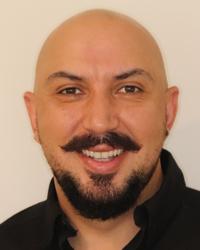
Sam Dias has been working within the Dental Laboratory field since the early 1990s. In 2005, he completed his Dental Technology Diploma and in 2008 he opened and ran a fully functional Dental Laboratory. He then continued on to further complete his Advanced Diploma of Dental Prosthetics in 2010, followed by opening up his first Dental Practice in Sydney. After continuing to practice both within the Dental Surgery and the Dental Laboratory, he opened a second dental practice in 2013. Two years later he opened a third dental practice followed by opening his fourth in 2017. During this time, Sam has continued to further his knowledge within all areas of dentistry by travelling the world completing courses and searching for innovative ideas. He has continued to build his businesses around the latest dental technologies, whilst gaining knowledge and experience in using the cutting edge products and procedures. Sam now runs courses and lectures on the products he uses and the techniques he has developed. Sam is well-known and respected within his local communities for being a passionate, genuine and caring practitioner whilst also being a dedicated and hard working business owner.
Design in Exocad (BASIC):
Summary: Utilizing Collected Data: Application of gathered information in design software.
Pre-editing and Importing Data:
- Adjustments as Needed: Preliminary modifications for scan data. (trios, itero, or depending on scanner used)
- Step-by-step Wizard Setup: Importing and navigating data systematically.
Model Modifications:
Tooth Selection:
- Library Selection: How to choose the appropriate tooth library for the case.
- Material Consideration: Case-specific material choices based on application.
- Measurement Tools: Utilizing tools accurately with collected data.
Tooth Setups:
Various Techniques:
- Chain Mode, Free-form, Anatomic Morphing: Exploring different tooth setup methods.
Base Design:
- Smoothing and Thickness: Adjusting for material and case-specific considerations.
Model Design:
- Comprehensive Design Process.
Exporting:
- Finalizing and Outputting Designs.
Design in Exocad (EXPERT):
Pre-Editing and Meshmixer Use:
- In-depth pre-editing of data using Meshmixer.
- Expertise in modifying scans, including flipping normals.
CM MEDICAL Office
(Unit 10F / 16 Mars Road, Lane Cove West, NSW 2066)
Please use Google Map link to find us. (https://maps.app.goo.gl/xX8bKHAwvSTjgWqRA)
Early Bird Discount 10% for the first 5 registrants
If not working, please copy and paste this link to your browser. (https://www.cm-medical.com.au/products/exo-denture)
10% Early Bird Discount will be applied automatically when you check out.
Exocad installation will be required in prior to the course. We will contact you for the remote installation individually.
All attendees have to bring own Windows OS laptop PC, its power cable and computer mouse. The powerful pc would be recommended.
Seats are limited for better learning experience***
info@cm-medical.com.au
Kevin Park 0427 466 588